Free interactive tool

Find out what your RAID stack is really costing you.

The Storage Advisor measures the Storage Tax on your own array, then walks you to the configuration that stops paying it. Five steps, no spreadsheet.
Launch the Storage Advisor
~5 minutes
·
no download
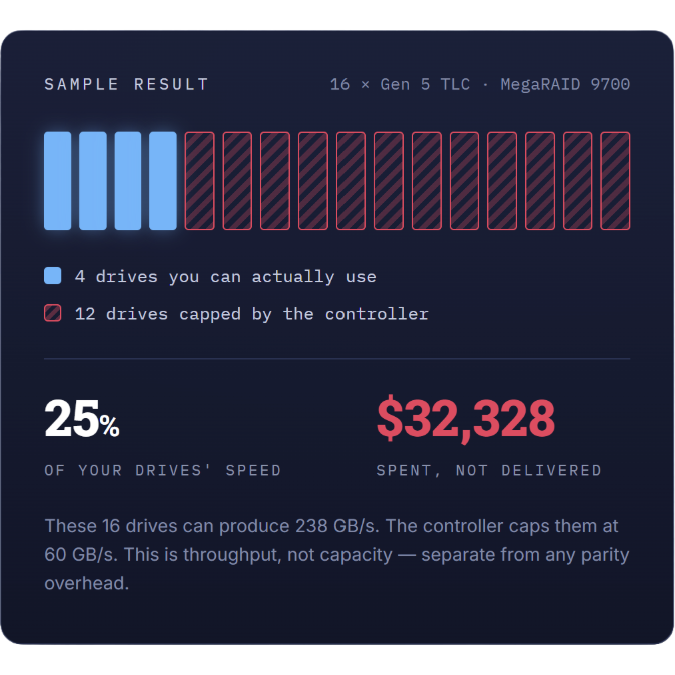
Bar graph representing drive you can actually use and drives capped by the controller

Why this exists

Nobody Budgets for the Drives They Can't Reach.

You size an array by capacity and drive count. What you rarely see on the quote is the ceiling your RAID stack imposes on all of it — and every drive above that ceiling is money spent on performance that never arrives.

The Storage Advisor makes that number visible in your own configuration, then keeps going: it matches your priorities to a product, tunes the RAID level for usable capacity, and hands you a summary you can take to a budget conversation.

It works whether or not you end up buying anything from us. The first two steps are worth running on their own.

How it works

Five Steps, Start to Finish.

Each step feeds the next. Change your mind at any point and everything downstream updates.

01

Quantify the tax

Set your drive count, drive class and the RAID stack you run today. The calculator compares what your drives can deliver against what your controller can pass through.

You Get

Effective vs. installed drives
Utilization %
Dollar spent, not delivered
02

Set your priorities

Rank throughput, IOPS, cost, power efficiency, RAID flexibility and availability from 1 to 5. Your deployment gets plotted as a profile rather than a checkbox list.

You Get

Your requirement profile
Plain-language read on each factor
A first product match
03

Compare the portfolio

See your profile against every SupremeRAID tier and VROC by Graid Technology. Filter by workload, OS support, RAID levels, drive count, throughput and price.

You Get

Profile overlay per product
Full-specification table
Shortlist to carry forward
04

Optimize the array

Choose a RAID level and watch drives needed, usable capacity, cost per usable GB and protection level move together across RAID 0, 1, 5, 6 and 10.

You Get

Drives needed for your target
Usable storage by RAID level
Cost per usable GB
05

Take the summary

Everything resolves into one page: what you pay today, what you would recover, the capacity a different RAID level would free, and the product that fits.

You Get

Storage Tax summary
Recovery and savings
Shareable one-pager

what you leave with

A one-page summary built from your inputs, not a brochure.

Tax document coming out of envelope

your storage tax

Current utilization, the drives your controller is capping, and what they cost.
Shield with check mark on inside and an arrow circling around it

youR recovery

The utilization a Graid configuration returns, and the throughput that comes with it.
Gear with speedometer

capacity upside

Usable storage and cost per usable GB, compared across RAID levels.
Gear with check mark in the center

the fit

The SupremeRAID™ tier or VROC configuration matched to your priorities.